







Checklist: Error Handling for AI Product Launches
Launching an AI product without proper error handling is a recipe for disaster. AI systems are unpredictable, prone to errors like hallucinations, model drift, and token cost spikes. Without safeguards, these failures can erode user trust and derail your product. Here’s what you need to know:
- Pre-launch testing: Simulate failures, validate data, and stress-test for scalability.
- Recovery mechanisms: Use fallback systems, circuit breakers, and human-in-the-loop processes.
- Monitoring: Track latency, error rates, and task completion with real-time alerts.
- Rollback strategies: Automate rollbacks, use feature flags, and document emergency procedures.
- Post-launch iteration: Collect user feedback, analyze logs, and refine error-handling systems.
Proactive error management isn’t just about fixing issues - it’s about maintaining reliability and user confidence. From pre-launch validation to post-launch updates, this checklist ensures your AI product is ready to handle challenges effectively.
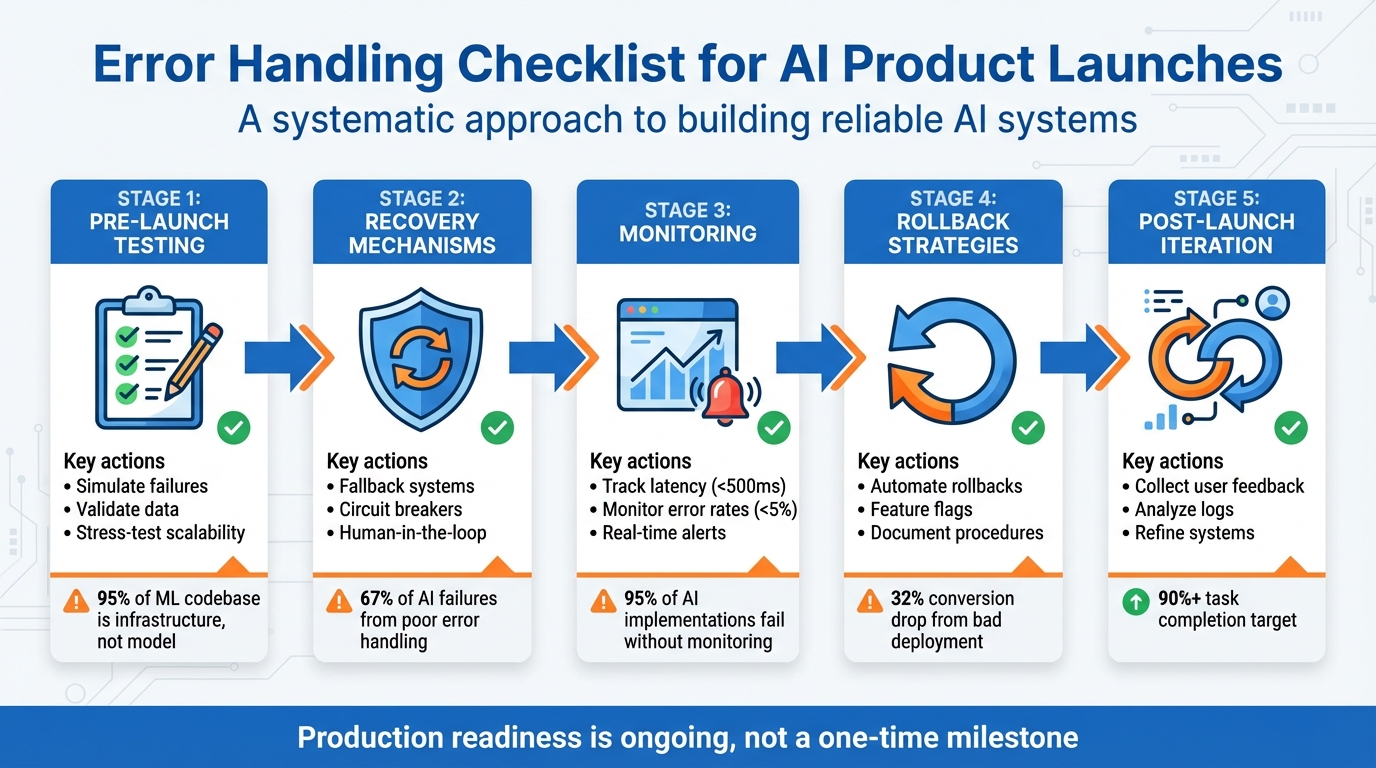
5-Stage AI Product Error Handling Checklist for Launch Readiness
Debugging AI Products: From Data Leakage to Evals with Hamel Husain | Just Now Possible
sbb-itb-c336128
Pre-Launch Error Handling Validation
Before launching your AI product, it's essential to ensure the system can handle failure scenarios effectively. A key step in this process is to deliberately test your system's resilience by simulating breakdowns. This practice helps prepare your product for real-world challenges [5]. Interestingly, in machine learning systems, the majority of the codebase - over 95% - is dedicated to infrastructure, data management, and validation, while the actual model code accounts for less than 5% [7]. This highlights the need for a comprehensive testing strategy that goes beyond simply verifying if the model produces an output.
Test Core AI Error Scenarios
Begin by simulating common failure scenarios like network timeouts, API outages, malformed JSON, rate limits, and invalid inputs. This approach, known as failure injection testing, helps you verify that rollback and recovery mechanisms function as intended when issues arise [5][6]. Perform unit tests for individual tools, covering success, failure, and edge cases such as null values. Then, progress to end-to-end integration tests using real large language model (LLM) calls instead of mocks. This ensures you catch unexpected behaviors that may only surface when components interact [5][8].
Incorporate adversarial testing, such as red-teaming, to uncover vulnerabilities like prompt injection risks [6][8]. These potential weaknesses might not appear during standard testing but could emerge once your product is in the hands of real users.
Validate Data and Edge Cases
Unpredictable inputs are inevitable, so prepare by generating synthetic data variations and analyzing production logs for near-miss events [6][8]. Tools like Ragas or Hugging Face's Synthetic Data Generator can create thousands of domain-specific prompts and rare corner cases. Collaborate with domain experts to identify high-stakes scenarios that automated tests might miss [8].
Automated validation tools, such as Great Expectations, can be integrated into your data pipelines to detect missing values or outliers before they reach the model [2]. Additionally, create stratified test sets that reflect your entire user base, paying close attention to minority groups and critical edge cases that might be overlooked in overall performance metrics [2]. To further protect your system, implement circuit breakers that halt requests to failing AI services, preventing a full system collapse during anomalies [2].
Simulate Concurrent Inference and Stress Test
Success under light usage doesn't guarantee stability at scale [9]. Use load testing tools to send high-concurrency requests and uncover issues like timeouts or resource bottlenecks [6]. Simulate traffic spikes to identify CPU or GPU limitations during peak loads [6]. Instead of focusing on average response times, prioritize tail latency - particularly the 99th percentile (p99) - to understand the experience of users facing the longest delays [2].
Apply the USE Method to evaluate every resource (CPU, memory, network, storage) for utilization, saturation, and errors [10]. Even if resource usage isn't maxed out, short bursts of activity can cause significant slowdowns [10]. A good rule of thumb is to provision resources to handle at least twice your expected peak load, ensuring a buffer for unexpected traffic surges [2]. Finally, test your auto-scaling policies in a staging environment to confirm they activate reliably during spikes and scale down efficiently to manage costs [2].
These thorough pre-launch tests are essential for building a system that can recover gracefully from errors and handle high-demand scenarios.
AI Model Error Recovery Mechanisms
Building systems that can recover automatically from AI model failures is just as important as pre-launch testing. Interestingly, about 67% of AI system failures are caused by poor error handling rather than issues with the algorithm itself [11]. The focus shouldn't be on eliminating failures entirely but on managing them effectively. Below are key strategies to ensure your system continues functioning smoothly even during production hiccups.
Implement Graceful Degradation
To maintain functionality, use a multi-tier fallback system. Start with your primary high-performance model (like GPT-4). If that fails, shift to a secondary option (such as Claude or GPT-3.5), then rely on cached responses from previous successful outputs, and as a last resort, use static, template-based answers for common queries [12]. Setting timeouts between 10–30 seconds ensures fallback responses are triggered promptly [12].
Circuit breakers play a crucial role in preventing cascading failures. These monitor the health of your AI service and "open" when errors surpass a certain threshold, redirecting traffic to fallback systems [12][13]. There are three states to define: Closed (everything is normal), Open (fallbacks are active), and Half-Open (testing recovery) [12]. This approach is critical - after all, even major language model providers only guarantee 99.9% uptime, which means downtime is inevitable [12].
Detect and Correct Hallucinations
AI-generated hallucinations must be caught before they reach users. One way to do this is by running real-time validation checks to identify issues like invalid JSON or repetitive patterns. If violations are detected, outputs can be halted immediately [12][14][15]. For factual accuracy, break down lengthy responses into individual sentences and compare each one against your knowledge base [14].
Start guardrail testing with robust models like GPT-4o, then shift to smaller, more cost-efficient models for ongoing checks [14]. Specialized evaluation models can assess response quality at a fraction of the cost - up to 97% less - compared to using large language models for the same task [3]. For critical operations, such as financial transactions, establish human-in-the-loop protocols. This means repeated failures or risky actions automatically escalate to a human operator for review [15][11].
Build Fallback Pathways
When your AI components fail entirely, alternative workflows ensure your product remains operational. Use feature flags to instantly disable malfunctioning AI features [2][4]. Make all state-modifying operations idempotent by assigning unique request IDs, so repeated actions (like charge_customer) don’t cause duplicate effects [5]. For every action your AI performs, define a corresponding rollback action (e.g., refund_customer) to execute automatically if downstream processes fail [5].
Version-control all interdependent components - such as model weights, prompts, and preprocessing steps - so you can easily roll back to a stable version when needed [3]. Set automated triggers to shift traffic back to previous versions if issues like hallucination rates, latency, or costs exceed acceptable thresholds [3]. To ensure these fallback systems work as intended, use failure injection during testing. This involves deliberately causing errors, such as timeouts or malformed responses, in a staging environment to confirm your recovery mechanisms activate as expected [12][5].
Monitoring and Alerting for AI Errors
Once you've established recovery frameworks, the next step is proactive monitoring to catch and address errors quickly. Simple logging won’t cut it for AI systems. Instead, you need detailed tracing that follows the entire process - from a user's click to vector store queries, model calls, and tool executions [16][18]. Without proper production monitoring, 95% of AI implementations hit roadblocks due to "invisible failures", such as hallucinations or broken reasoning chains [17].
"Prompt in and response out is not observability. It is vibes." - Rahul Chhabria, Sentry [16]
Set Up Real-Time Error Monitoring
To stay ahead of issues, track critical metrics like:
- Latency: Keep it under 500 ms.
- Error rates: Aim for below 5%.
- Task completion rates: Should hit at least 90% [17].
When logging, generate a unique UUID at the start of every request and include it in all entries. This makes it easier to trace the flow of a conversation for debugging purposes [17]. Additionally, monitor retrieval and generation processes separately to pinpoint whether failures arise from your vector store or the LLM itself [17].
Define Alert Thresholds
Instead of reacting to every minor spike, base alerts on error budget burn rates [20][21]. This helps you focus on meaningful issues. Combine multiple signals for smarter alerts - for instance, trigger high-priority notifications only when latency spikes align with increased error rates [20]. Use a tiered alert system (P1/P2/P3) to classify severity, ensuring only critical, user-facing issues wake up on-call engineers [20][21]. Real-time alerts for token usage spikes are also essential to catch runaway behaviors, like infinite loops, before they rack up massive API costs [16][17].
"Alert fatigue kills reliability programs. Alert on the few things that truly require a human at 3 am, and push the rest to ticket queues or dashboards." - Maxim AI [21]
Integrate Monitoring Tools
Once your thresholds are set, connect them to monitoring tools for instant incident response. Follow OpenTelemetry standards to enable seamless integration across platforms like Sentry, New Relic, and Grafana, avoiding vendor lock-in [18][19]. For cost-effective options, tools like Helicone offer proxy-based setups, while Langfuse provides SDK-based integration with robust tracing and self-hosting capabilities [17]. For high-stakes applications, enterprise solutions like Galileo or Datadog LLM can handle hallucination detection and ensure 100% sampling [17].
Finally, link your monitoring system to incident response platforms like Slack, PagerDuty, or Microsoft Teams. This ensures that alerts reach the right team members without delay [19][18][21].
Rollback Strategies and Emergency Procedures
When AI systems fail in production, acting fast is non-negotiable. A retail platform once experienced a 32% drop in conversions due to a flawed model deployment [22]. While graceful degradation keeps some functionality intact, rapid rollback is essential to limit business disruption. After proactive monitoring, having a solid rollback plan becomes your next safety net.
Use Feature Flags for Controlled Releases
Feature flags let you separate AI configurations from the underlying code, making it easier to update or roll back changes without redeploying. Start by rolling out new AI features to a small group - just 1–5% of users - using a canary deployment. This approach minimizes the impact of potential failures [22]. Feature flags can also be used to selectively disable specific functionalities, such as turning off a refund tool or pausing a web search feature, without needing to revert the entire system.
Automate Critical Rollbacks
To complement controlled releases, combine feature flags with monitoring tools to automate rollbacks when key metrics indicate trouble. For instance, set triggers for technical issues like latency exceeding 500 ms or error spikes. You can also monitor for AI-specific problems, such as hallucinations or violations of safety protocols, and business-related indicators like conversion rate drops or unexpected token cost increases [22]. In one case from June 2025, an e-commerce platform deployed a new model that increased clicks but caused a 15% drop in purchases. Thanks to their blue-green deployment strategy, they reverted to a stable version within 30 minutes, avoiding further revenue loss.
Document Manual Rollback Steps
For more complex failures, having detailed manual procedures is crucial. Clearly define rollback triggers and treat all AI components as a unified system to prevent unexpected issues. Emergency steps should include kill switches, database restoration, cache invalidation, and smoke tests. Additionally, outline escalation paths with contact details for on-call engineers, data scientists, and legal teams, organized by severity. Regularly conduct monthly rollback drills to ensure your recovery processes remain effective, especially after infrastructure updates.
"In the world of AI, it's not if something fails - it's when. Your ability to recover quickly and cleanly will define your operational excellence and user trust." - GoFast AI [22]
Post-Launch Error Recovery and Iteration
After launch, user interactions often uncover unexpected errors, making continuous iteration essential. A study of 300 public AI deployments revealed that many pilots stall, with only a small fraction achieving measurable results [17]. The key difference between success and failure often lies in how systematically teams address and learn from production errors. Post-launch practices build on pre-launch and monitoring efforts to quickly identify and resolve issues.
Monitor User Feedback
Once your system is live, gathering and analyzing user feedback is critical for improving error handling. This includes both explicit feedback (like surveys or service tickets) and implicit signals (such as repeated rejections or specific keyword triggers) [1][19][4]. Organize feedback into categories like incorrect outputs, incomplete responses, unsafe suggestions, or hallucinations. This helps pinpoint whether the problem originates from the model, prompts, or retrieval system [4]. Prioritize fixes based on their frequency and impact - a hallucination in a healthcare app requires immediate attention, while a minor issue in an entertainment chatbot can be addressed later.
Analyze Incident Logs
Logs play a crucial role in diagnosing and resolving errors. Assign a unique identifier to each log to track the entire execution history [17][5]. These logs should include the full prompt, model response, system parameters (e.g., temperature, seed), tool calls, and retrieved context - essentially everything needed to replicate failures [17][5]. Save logs in formats like JSON or JSONL for easy querying using tools like SQL, jq, or Elasticsearch [5]. Instead of treating every error as a one-off, use automated tools to group similar failures into clusters [3]. Pay special attention to three recurring patterns:
- Context window overflow: Issues arising from overly long conversations.
- Data quality mismatches: Differences between production data and test data.
- High temperature settings: Inconsistent results caused by overly random outputs [17].
"Observability transforms random failures into debuggable patterns. It enables root cause analysis instead of blind guessing." - Softcery [17]
Iterate and Improve Error Handling
Before rolling out fixes, test them in shadow mode. This allows the system to process live traffic without showing predictions to users, offering a safe way to compare performance [2]. Use feature flags to enable or disable new recovery mechanisms instantly, avoiding the need for full code redeployment [5][2]. Version all components - model weights, prompts, preprocessing scripts, and hyperparameters - to ensure consistent rollbacks if needed [3][5]. For high-stakes decisions flagged during monitoring, route them to human reviewers to validate new logic before automating the process [5][23].
Daily testing with "golden canaries" - a curated set of prompts representing common user-reported issues - helps ensure that previously fixed problems don’t resurface [4]. This proactive approach keeps your system robust and responsive to evolving user needs.
Conclusion
Launching an AI product without a solid approach to error management is like trying to build a house on quicksand - it simply won’t hold up when faced with real-world challenges. Skipping proper error handling introduces major risks, especially since the leap from a functioning prototype to a reliable production system is often underestimated. The key difference between success and failure lies in how well you prepare for potential failures, track performance, and ensure every component can recover effectively.
As discussed earlier, features like graceful degradation, automated rollbacks, full-context observability, and human-in-the-loop safeguards are not just nice-to-have - they’re absolute essentials for any production-ready AI system. Software Engineer Hady Walied emphasizes this point:
"If you can't check all these boxes, you're not ready for production. That's not a judgment but it's a fact. Production agents that modify real state need the same rigor as traditional software" [5].
For teams looking to simplify this process, tools like ClackyAI (https://clacky.ai) offer a practical solution. With built-in diagnostics, real-time debugging, and detailed analytics, ClackyAI enables teams to integrate robust error recovery mechanisms from day one. Instead of spending weeks setting up monitoring systems or manually troubleshooting production issues, you can focus on refining your product based on real user feedback.
Ultimately, achieving production readiness is not a one-time milestone - it’s an ongoing effort. By prioritizing testing, implementing automated rollbacks, maintaining detailed logging, and creating feedback loops, you’ll ensure your AI product evolves to meet challenges over time. This disciplined approach will protect both your product’s integrity and the experience of its users.
FAQs
How can I effectively test for AI system failures before launch?
To properly assess potential AI system failures before launch, it's crucial to prioritize stress testing and adversarial testing. These techniques are designed to expose weaknesses by pushing the system with heavy workloads, unusual inputs, or even simulated malicious attacks. This process ensures the system is prepared to handle unexpected, real-world scenarios without breaking down.
It's also important to implement automated validation pipelines alongside functional, security, and human-driven testing. These combined efforts help uncover and address flaws, making the system more reliable and better equipped for deployment. Thorough testing not only minimizes the chance of errors affecting users but also boosts confidence in the system's dependability.
What are the best practices for real-time AI error monitoring?
To keep a close eye on AI errors as they happen, focus on two key areas: detailed observability and early detection. Keep track of essential system metrics like availability, latency, and dependencies, while also monitoring AI-specific factors such as accuracy, data drift, and response quality. Logging prompts, responses, and user interactions is essential for spotting problems like regressions or fabricated outputs and for performing thorough root cause analysis.
Set up real-time alerts using tools like Slack or PagerDuty to quickly address anomalies, such as missed steps or safety breaches. Incorporate monitoring into your CI/CD pipelines to catch issues like model drift before they reach production. Additionally, use unique request identifiers to make debugging more straightforward. These steps help ensure your AI system stays dependable and responsive, reducing unnoticed errors and enhancing the overall user experience.
What role do feature flags play in rolling back AI system changes?
Feature flags make rolling back changes a breeze. They let you quickly disable or tweak specific features without needing to redeploy your entire codebase. This means less downtime and a faster response to any hiccups that might pop up.
With feature flags, teams can test new features in a controlled setting, roll them out gradually to users, and reverse changes effortlessly if something goes wrong. This approach keeps things flexible and ensures a smoother experience for users, especially during AI product launches.